The Hidden Challenges of Git: Lessons from Working in Large Projects

The Hidden Challenges of Git: Lessons from Working in Large Projects
Posted on 08 Sep 2025
Introduction
Git has become the standard tool for version control, powering collaboration and release management from personal projects to large enterprise systems. Yet despite its ubiquity, Git is not easy to master: managing complex merges, feature integrations, and clean histories can be challenging as projects scale. I don’t claim to be an expert, but I’d like to share the practices and lessons that have helped me (and my teams) keep large projects organized and under control.
You should read this article if:
- you work on a Git repository shared by several developers and integration has become painful;
- you need a traceable release process with release candidates and hotfixes;
- you want to know when a simpler branching model is enough.
Branching Strategy for Large-Scale Projects
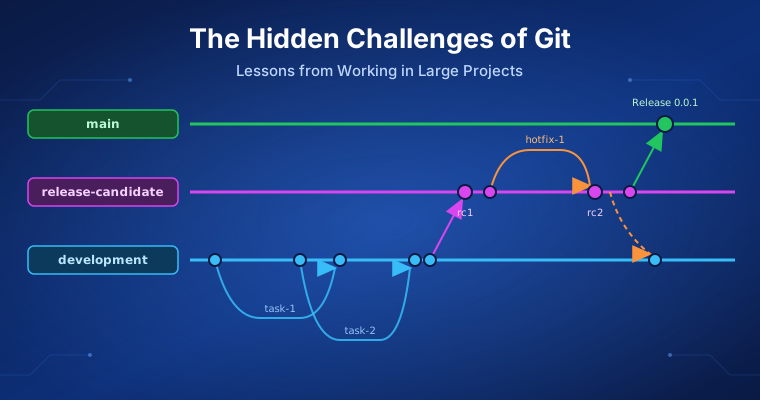
For large projects with multiple contributors, a clear branching strategy is essential. Keeping the workflow simple but disciplined helps avoid confusion and reduce integration pain. The model below is a simplified variant of the classic git-flow branching model.
- Shared branches: Use three protected branches:
development,release-candidate, andmain. Thedevelopmentbranch is where feature branches are merged and tested together. Once enough features are ready, code moves torelease-candidate. When stable, it’s promoted tomainfor production. - Feature branches: You develop each new feature in a separate branch (e.g.,
feature-<your feature name>) created fromdevelopment. After automated tests and code review, you merge it back and delete the branch to keep the repo clean. - Hotfix branches: You fix bugs discovered in
release-candidatein dedicated branches (e.g.,hotfix-<your hotfix name>) created fromrelease-candidate, then test, review, and merge them back. Multiple cycles may be needed until the release is stable for promotion.
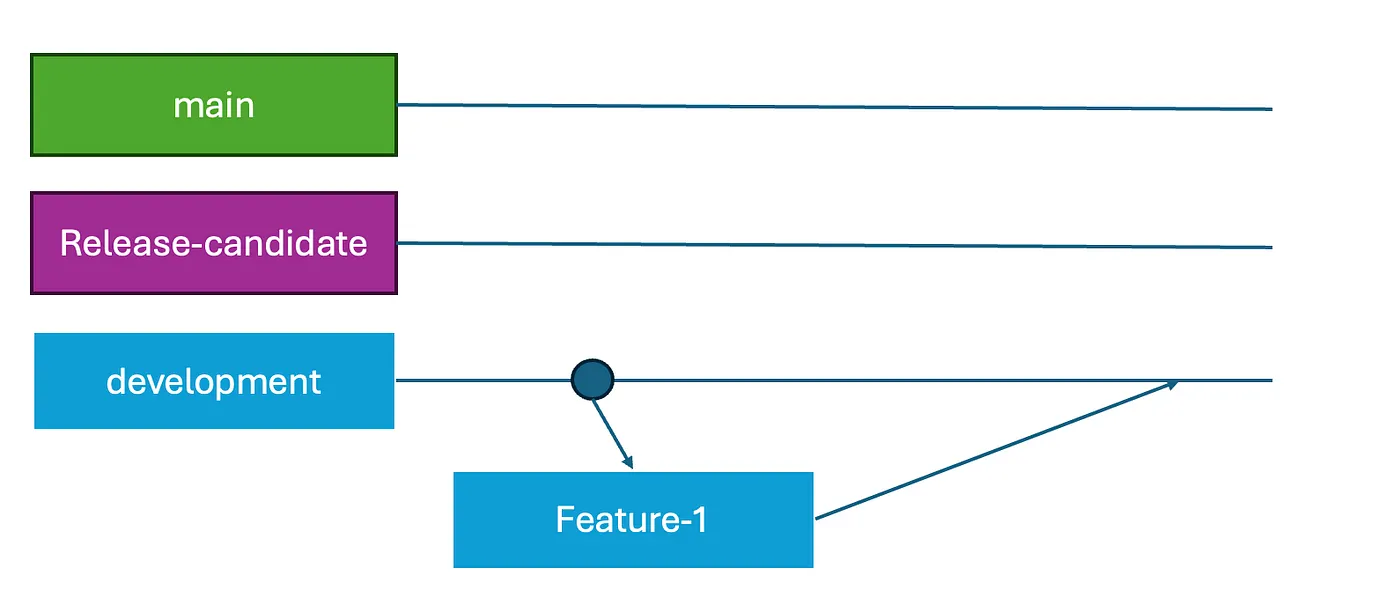 Git shared branches
Protect Your Shared Branches
Always protect your shared branches (development, release-candidate, main) and avoid direct pushes. Require all changes to go through pull requests (PRs) with code review and passing tests. On GitHub, you configure this with protected branch rules. This keeps the branches stable, ensures review, and maintains a clean history. The automated tests that gate each PR are the same ones I describe in Testing Python Applications with pytest.
Breaking Down Features into Task Branches
Small features that can be completed in 1–3 days can use a single feature branch: create it from development, implement the work, test it, open a PR, and merge. Simple and efficient.
For larger features, long-lived feature branches often cause painful merges, outdated code, and poor visibility. Many teams fail here because they don’t spend enough time breaking a feature into autonomous, functional tasks that can be merged directly into development. It is the same idea of small, shippable increments behind Agile methodology.
Each task should be developed in its own branch (e.g., task-<your task name>), fully functional and testable on its own. Once reviewed and tested, it merges directly into development. This ensures incremental progress and continuous integration, and avoids risky end-of-feature merges. The result is a workflow closer to continuous delivery of building blocks than to infrequent large drops.
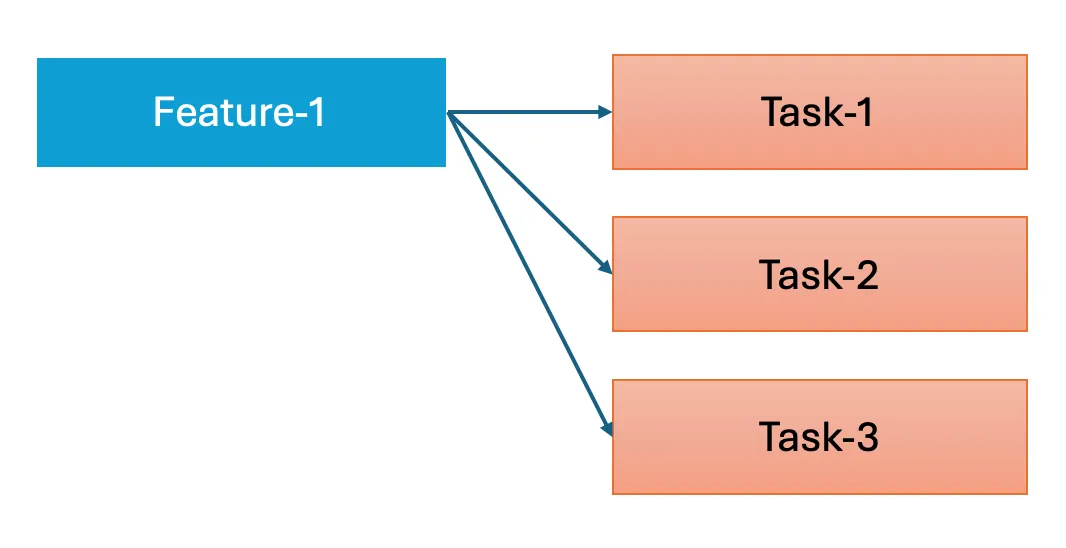 Breaking a feature into tasks
Daily Rebase and Single-Commit PRs
When working on a task or small feature, the developer creates a branch and should rebase it daily onto development to stay up to date. Many developers, both junior and experienced, struggle with rebases and conflict management. Once the task is complete, it’s important to submit the PR as a single commit (a manual squash could be required), making it easier for reviewers to see exactly what changed.
In practice, the daily routine and the final squash look like this:
# Daily: replay your task commits on top of the latest development
git fetch origin
git rebase origin/development

# Before opening the PR: squash your task commits into one
git rebase -i origin/development
git push --force-with-lease
git rebase origin/developmentreplays your commits on top of the remotedevelopment, so conflicts surface early and in small pieces.git rebase -iopens an editor where you mark every commit except the first assquash(ors). See the git-rebase documentation for all options.--force-with-leaseupdates your remote task branch after the rewrite, but refuses to overwrite commits someone else pushed in the meantime.
During review, you may push additional commits to address feedback. GitHub’s “Squash and merge” or “Rebase and merge” buttons collapse or replay them cleanly; see About merge methods on GitHub. Always rebase your task branch instead of merging development into it, to avoid extra merge commits on development. After merging, delete the branch to prevent conflicts and a diverging commit history.
This approach keeps the history clean, ensures smooth reviews, and allows small tasks to integrate safely and incrementally into the main development flow.
Release Candidate and Hotfix Workflows
Once a sufficient number of features are ready for production, the release candidate (RC) cycle begins. Often, multiple release candidates may be required before the final release. The process starts by promoting the code from development to release-candidate via a PR. I recommend using “Create a merge commit” and naming it clearly, e.g., Release Candidate: <version>-rcX. This makes it easy to track what each release candidate contains by looking at the commit history in both release-candidate and main.
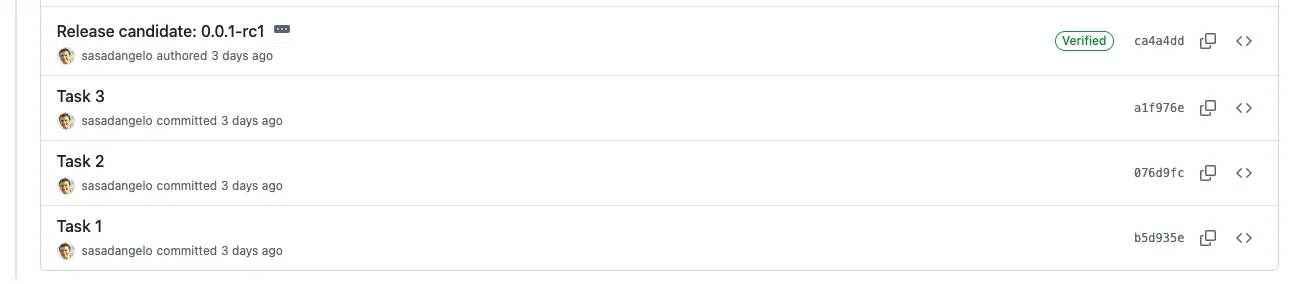 Release candidates tracked with merge commits
The code is then deployed to a staging environment, where end-to-end tests run. If you find defects, you fix them in a hotfix branch created directly from release-candidate and merge it back via PR. Each hotfix effectively generates a new release candidate, while development continues its next development cycle independently.
Once the release candidate passes all tests and is stable, the code is ready to be promoted to main and deployed to production. This workflow ensures a clear, traceable, and controlled path from development to production, reducing risks and making each release auditable. It is the Git side of the delivery pipeline I discuss in DevOps in Software Development.
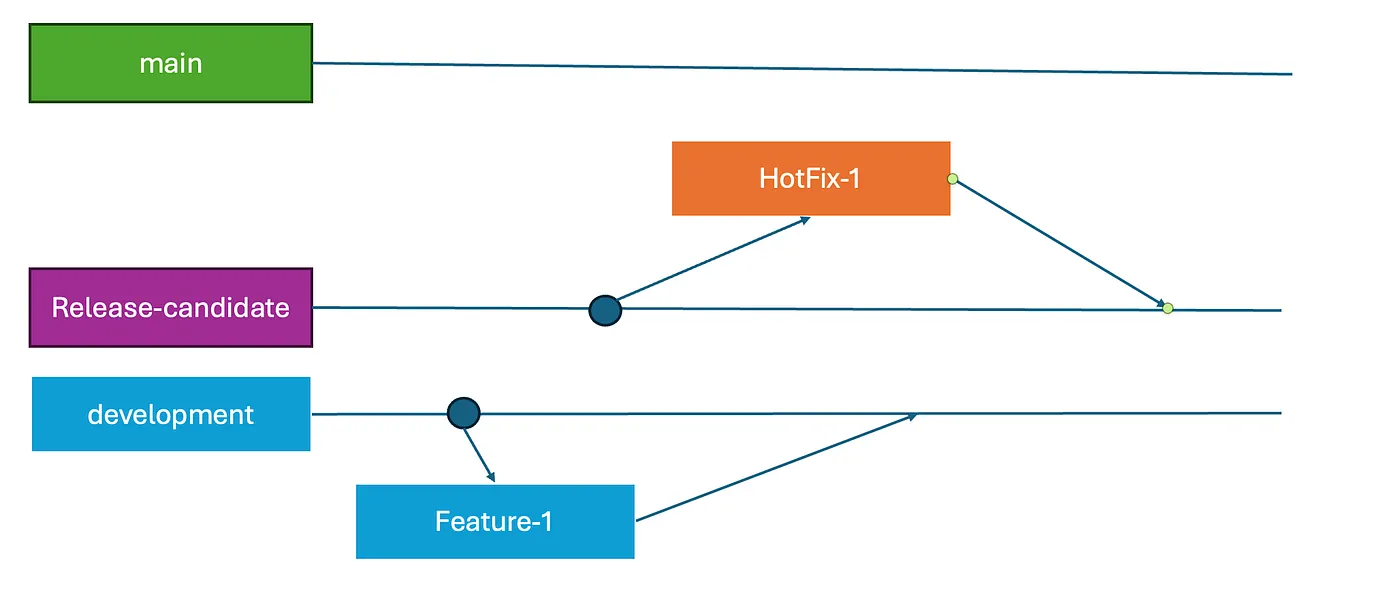 Release candidate and hotfix workflow
Promote Code to Production
When a release candidate is ready for production, open a PR to merge release-candidate into main. I recommend using “Create a merge commit” and naming it clearly, e.g., Release: <version>. This not only shows all task commits included in the release but also documents the release candidates that preceded it.
Once the code is deployed to production, merge any hotfixes applied to the release candidate back into development to keep it up to date and aligned with production.
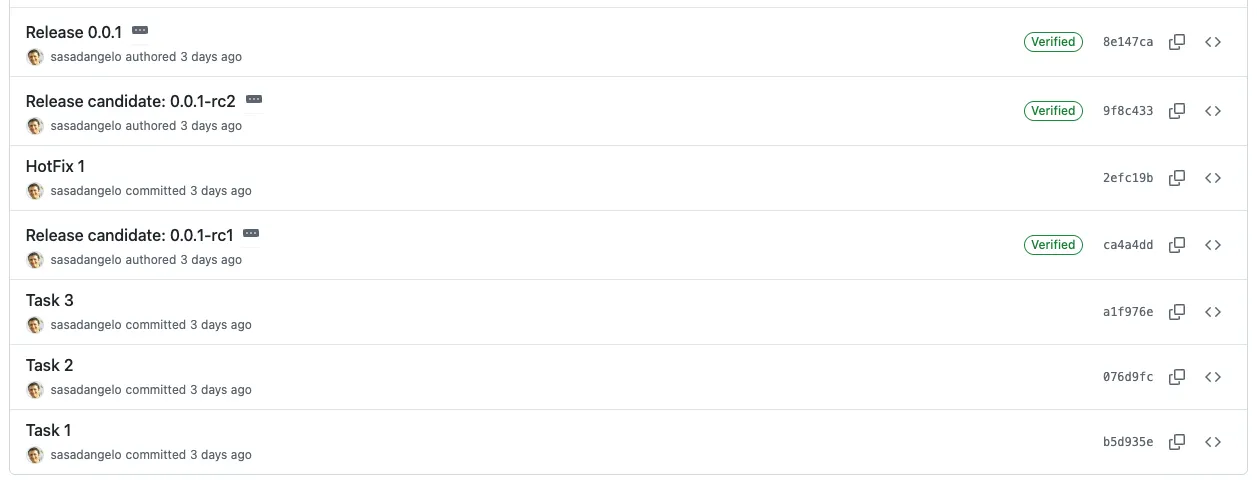 Releases tracked with merge commits
Keep Development in Sync with Hotfixes
After merging a hotfix into release-candidate (or main), always bring those changes back into development through a PR with a merge commit. Since development is a protected shared branch, never rebase it: that would rewrite history everyone else has already pulled. This ensures development stays up to date with production fixes and avoids regressions in future releases.
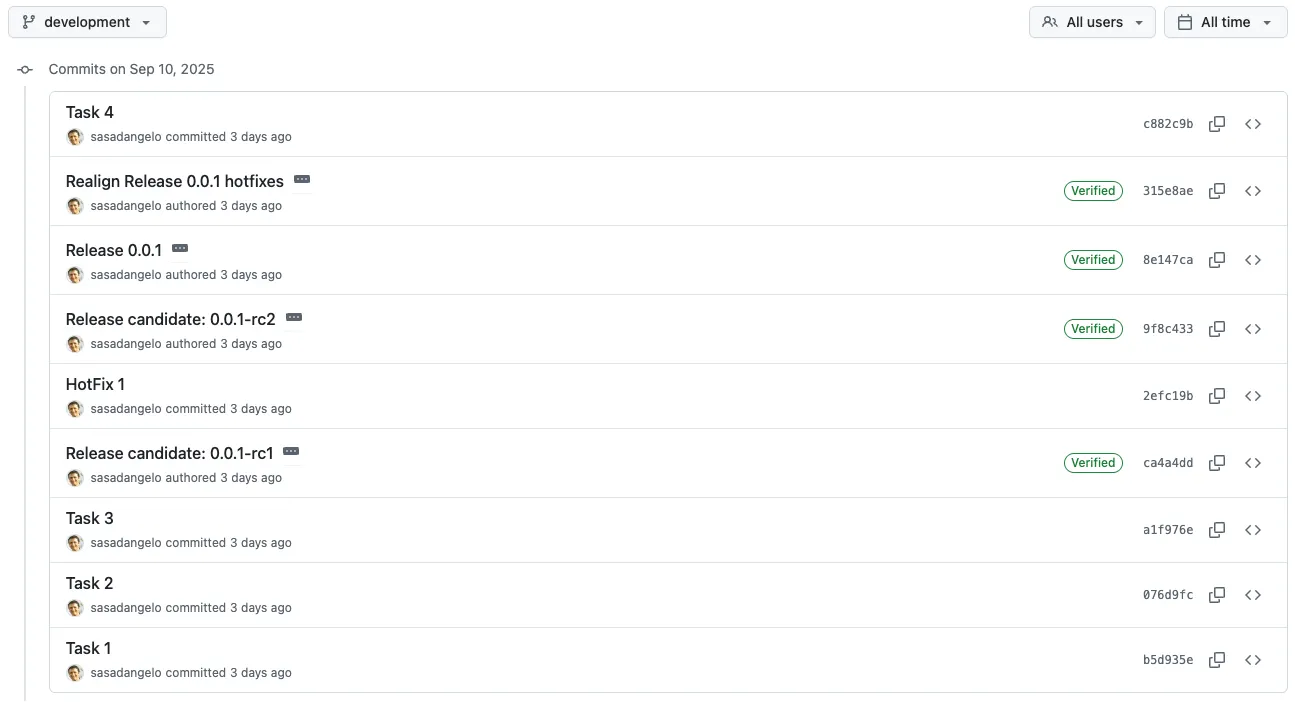 Keeping development in sync with hotfixes
Simplifying for Small Teams or Rarely Updated Repositories
Not all projects need a complex set of shared branches. For very small teams (2–3 people) or repositories that are updated infrequently, for example metadata repositories, maintaining three protected branches (development, release-candidate, main) may be overkill.
In these situations, consider simplifications:
- Single
mainbranch: If changes are rare and the risk of conflicts or regressions is low, a single branch may suffice. Developers can test locally before merging directly intomain. This is close to trunk-based development. - Skipping
release-candidate: With fewer contributors, there may be less need for long release cycles, making a separaterelease-candidatebranch unnecessary. Features and fixes can be integrated and tested directly inmain.
This approach keeps the workflow simple while still maintaining control and traceability for small-scale projects.
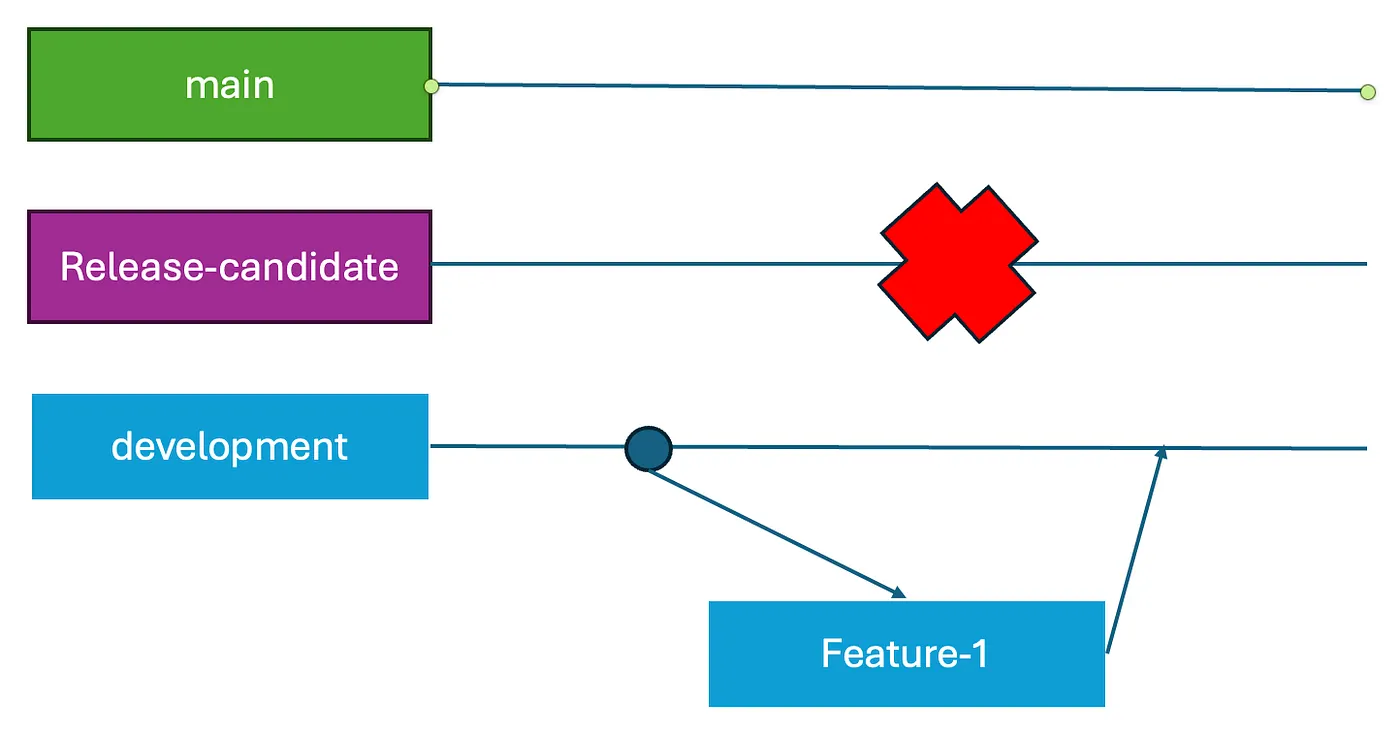 Simplified shared branches
The table below summarizes which setup fits which kind of project:
| Project type | Shared branches | Release candidates | Hotfix flow |
|---|---|---|---|
| Large team, frequent releases | development, release-candidate, main |
Yes, tracked with merge commits | hotfix-* from release-candidate, merged back into development |
| Small team (2–3 people) | development, main |
Optional | Fixes integrated and tested directly in main |
| Rarely updated repository | main only |
No | Fix directly on main via PR |
Conclusion
A disciplined branching strategy and incremental, task-focused development keep Git histories clean and integration smooth. Release candidates and hotfix workflows provide a controlled path to production, but small teams or rarely updated repositories can simplify with fewer branches. Clear conventions help teams collaborate efficiently, regardless of project size.
In this article we covered:
- three protected shared branches (
development,release-candidate,main) and why nobody pushes to them directly; - breaking large features into small task branches that merge independently;
- daily rebasing and single-commit PRs to keep history readable;
- the release candidate and hotfix cycle, tracked with named merge commits;
- when a small team or a rarely updated repository can drop branches.
In the next article of this series, Beyond Push and Pull, I step back to the core concepts underneath this workflow: where your changes live and how each Git command moves them.
If you enjoyed this article, don’t forget to give it a clap 👏, share it with your friends 🔗, and follow me for more tips and tutorials on software development 📘. Your support helps me create more content like this — thank you! 🙌
Note: English is not my native language, and this article was drafted with the assistance of AI. However, all the ideas, projects, concepts, and content are entirely my own.