
Building a CRUD Web Application with Flask: Three-Tier Architecture with SQLAlchemy and Pydantic

Introduction
In the previous articles of this series, I built a REST API with FastAPI, from its layered architecture to its tests. Not every application is an API, though: this article shows the same layered ideas in a classic CRUD web application built with Flask. It is also the application used as the example in Managing Application Configuration with Pydantic Settings and Logging in a Flask Application with Loguru.
Source code available on GitHub (0.0.2).
When you start building web applications with Flask, it’s easy to put all your code in a single file — routes, database logic, and HTML rendering mixed together. That works for prototypes, but as your project grows, you need structure.
In this article, I’ll show how I designed a three-tier Flask application for managing running races (“gare podistiche” in Italian), using:
- Flask for the web framework
- SQLAlchemy for database ORM
- Pydantic for data validation
- SQLite as a lightweight database
The goal is to demonstrate a clean separation of concerns — so each layer has a single responsibility and can evolve independently.
The application is in Italian; however, that’s not a problem for understanding how it works. The application lists races and allows you to create new ones and update existing ones.
Architecture Overview
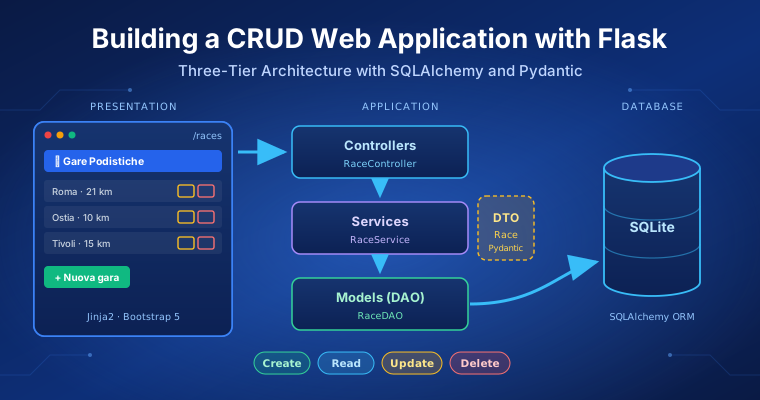
Our app follows a Three-Tier Architecture:
- Presentation. Handles the user interface and HTML page templates.
- Application. Contains the application logic: Controllers, Services, SQLAlchemy DAOs, and Pydantic DTOs.
- Database. Manages persistence with an SQLite database.
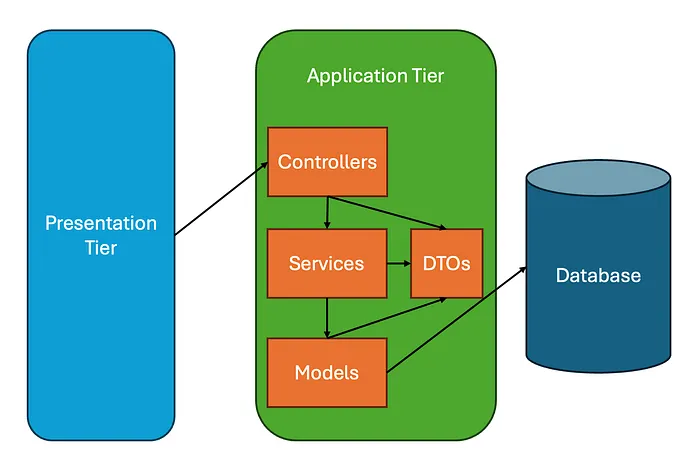 Three-tier Flask application
Inside the Application Tier, we follow a Layered Architecture:
- Controllers: handle HTTP requests and responses.
- Services: contain the core business logic (transactions, validation, etc.).
- Models (or Data Access Object — DAO): represent and manipulate database entities.
- DTO (Data Transfer Object): defines validated data structures via Pydantic.
This separation ensures testability, reusability, and scalability.
Presentation Tier
The Presentation Layer uses Flask’s Jinja2 templates to separate the UI from the logic.
For example, all templates extend a shared base layout, app/templates/base.html:
<!DOCTYPE html>
<html lang="it">

<head>
    <meta charset="UTF-8">
    <meta name="viewport" content="width=device-width, initial-scale=1.0">
    <title>{% block title %} {% endblock %}</title>

    <!-- Bootstrap 5 CSS -->
    <link href="https://cdn.jsdelivr.net/npm/bootstrap@5.3.2/dist/css/bootstrap.min.css" rel="stylesheet">

    <!-- Font Awesome 6 -->
    <link rel="stylesheet" href="https://cdnjs.cloudflare.com/ajax/libs/font-awesome/6.5.1/css/all.min.css">

    <!-- Custom CSS -->
    <link href="{{url_for('static', filename='css/style.css')}}" rel="stylesheet">
</head>

<body>
    {% block body %} {% endblock %}

    <!-- Bootstrap 5 JS Bundle -->
    <script src="https://cdn.jsdelivr.net/npm/bootstrap@5.3.2/dist/js/bootstrap.bundle.min.js"></script>
</body>

</html>
A small reusable header component, app/templates/header.html:
<nav class="navbar navbar-dark bg-primary shadow-sm">
    <div class="container-fluid">
        <span class="navbar-brand mb-0 h1">
            <i class="fas fa-running me-2"></i>
            Gare Podistiche
        </span>
    </div>
</nav>
And a page for listing races, app/templates/index.html (see the full code at this link):
{% extends 'base.html' %}

{% block title %}Gare Podistiche{% endblock %}

{% block body %}
{% include 'header.html' %}
...
{% endblock %}
The presentation tier is completed by a page to create new races (app/templates/create-race.html) and one to update existing ones (app/templates/update-race.html). This design allows HTML pages to focus purely on presentation, while Flask controllers and services manage routing and logic.
See the full templates on GitHub.
As we said at the beginning of this section, the code is not pure HTML: it includes Jinja2 templates to display data coming from the application tier.
app/templates/index.html needs the list of all the races to render them in the HTML page, and the Application Tier must retrieve them from the database. Similarly, app/templates/update-race.html needs to retrieve the race to update, to render its old data in the HTML. On the contrary, app/templates/create-race.html should pass the new race data to the Application Tier to let it store it in the database.
All this back and forth of data between the Application Tier and the Presentation Tier is managed by the Controller layer of the Application Tier, which handles the routing and the movement of data between the two tiers.
Application Tier
The Application Tier is the heart of the app. It contains three main layers — Controller, Service, and DAO — connected through DTOs (see the figure above).
Controllers Layer
Controllers handle incoming HTTP requests, render templates, and delegate logic to services. All routes are registered in app/routes/blueprint.py:
from flask import Blueprint

from app.controllers.races import RaceController

races_blueprint: Blueprint = Blueprint(name="races_blueprint", import_name=__name__)
controller: RaceController = RaceController()

# GET routes
races_blueprint.add_url_rule(rule="/", view_func=controller.get_races, methods=["GET"])
races_blueprint.add_url_rule(rule="/races", view_func=controller.get_races, methods=["GET"])
...
The controller itself (app/controllers/races.py) is responsible for:
- input validation via Pydantic;
- error handling and flashing messages;
- rendering the appropriate view.
For example, creating or updating a race:
def create_race(self) -> WebResponse:
    """Handle GET/POST to create a new race."""
    if request.method == "GET":
        return render_template(template_name_or_list="create-race.html")
    return self._handle_race_form_submission(is_update=False)
...

def _handle_race_form_submission(self, is_update: bool, race_id: int | None = None) -> WebResponse:
    """Process form data for create or update operations."""
    try:
        race_data: dict[str, Any] = self._extract_race_data()
        race_obj: Race = Race(**race_data)  # Pydantic validation

        if is_update:
            if race_id is None:
                raise ValueError("race_id cannot be None for update operation")
            self.service.update_race(race_id=race_id, race=race_obj)
            flash(message="Gara aggiornata con successo.", category="success")
        else:
            created_race: Race = self.service.create_new_race(race=race_obj)
            flash(message=f"Gara '{created_race.name}' creata con successo.", category="success")

    except ValidationError as e:
        self.logger.warning(f"Pydantic validation error: {e}")
        flash(message="Dati della gara invalidi. Controlla i campi del modulo.", category="warning")
    except RaceNotFoundError:
        flash(message="Gara non trovata.", category="warning")
    except Exception as e:
        self.logger.error(f"Unexpected error processing race form: {e}")
        flash(message="Errore del Server durante l'operazione.", category="danger")

    return redirect(location=url_for(endpoint=GET_RACES_ENDPOINT))
This keeps HTTP logic completely isolated from business logic and database code. You can notice that the controller only manages things at the routing level and delegates all the business logic to the Service Layer.
Services Layer
The Service Layer is where business rules live. It’s independent of Flask — making it easily testable and reusable. Example (app/services/races.py):
class RaceService:
    def get_all_races(self) -> list[Race]:
        """Retrieve all races from the database as Pydantic DTOs."""
        races_dao: list[RaceDAO] = RaceDAO.query.all()
        return [Race.model_validate(obj=r) for r in races_dao]

    ...

    def create_new_race(self, race: Race) -> Race:
        """Create a new race and return it as a DTO."""
        try:
            data: dict[str, Any] = race.model_dump(exclude={"id"})
            race_dao: RaceDAO = RaceDAO(**data)
            self.db.session.add(instance=race_dao)
            self.db.session.commit()
            self.logger.info(f"Created new race '{race.name}' with ID {race_dao.id}")
            return Race.model_validate(obj=race_dao)
        except SQLAlchemyError as e:
            self.db.session.rollback()
            self.logger.error(f"SQLAlchemy error creating race '{race.name}': {e}")
            raise
As you can notice, the DTOs move data across layers and the Service Layer is responsible for managing the transaction. If something goes wrong (e.g., SQLAlchemyError), the service handles the rollback and raises the exception to the controller.
DAO and DTO Layers
- The DAO (Data Access Object) represents the database structure via SQLAlchemy models.
- The DTO (Data Transfer Object), defined with Pydantic, provides strong typing and input validation.
This allows us to safely transform user input into database entities — without mixing ORM and validation logic.
# DTO example (Pydantic)
class Race(BaseModel):
    id: int | None = None
    name: str
    time: datetime
    city: str
    distance: int
    website: str

    model_config: ClassVar[ConfigDict] = ConfigDict(from_attributes=True)
Models Layer (DAO)
The Models Layer, also known as the DAO (Data Access Object) layer, provides a clean and object-oriented way to interact with the database.
Here, we use SQLAlchemy ORM to define a RaceDAO class that maps directly to a database table. This layer is intentionally lightweight: it knows nothing about Flask views or business logic — it only models data persistence.
Here is the code in the app/models/races.py file:
class RaceDAO(db.Model):  # type: ignore[name-defined]
    __tablename__ = "race"

    id = db.Column(db.Integer, primary_key=True, autoincrement=True)
    name = db.Column(db.String(50), nullable=False)
    # Use timezone-aware datetime in UTC
    time = db.Column(db.DateTime, default=lambda: datetime.now(timezone.utc), nullable=False)
    city = db.Column(db.String(20), nullable=False)
    distance = db.Column(db.Integer, nullable=False)
    website = db.Column(db.String(100))
Database Tier
The database layer uses SQLAlchemy ORM with SQLite for simplicity.
This layer doesn’t know anything about Flask or the web — it only defines and stores data.
You can replace SQLite with PostgreSQL or MySQL without touching the application or presentation code.
Why This Architecture Matters
This design offers several advantages:
- Separation of Concerns — Each layer has a single responsibility
- Reusability — Services can be reused in APIs or CLIs
- Testability — You can test the Service layer independently of Flask
- Scalability — Easy to extend with authentication, REST APIs, or other entities
In short: it’s a production-ready structure for Flask projects that need maintainability and growth.
Final Thoughts
Flask is often seen as a micro-framework, but that doesn’t mean your application has to be “micro” too. With a bit of structure, you can create clean, modular, and testable apps — like this one.
You can explore the full source code and run it locally from the GitHub repository.
Next Steps
If you want to extend this project, try adding:
- REST API endpoints (using flask-restx or Flask API)
- Authentication (Flask-Login or JWT)
- Pagination and search
- Unit tests for the Service layer
If you enjoyed this article, don’t forget to give it a clap 👏, share it with your friends 🔗, and follow me for more tips and tutorials on software development 📘. Your support helps me create more content like this — thank you! 🙌
Note: English is not my native language, and this article was drafted with the assistance of AI. However, all the ideas, projects, concepts, and content are entirely my own.