
Managing Application Configuration in Python with Pydantic Settings
Posted on 30 Dec 2025

Introduction
Any application, regardless of its size or domain, is always composed of two fundamental parts:
- binaries / application code
- configuration
The code defines what the application does, while the configuration defines how it behaves and in which context it runs. Keeping these two aspects clearly separated is a cornerstone of modern software engineering and becomes critical as soon as an application needs to run in multiple environments (development, staging, production). See principle 3 of the 12-Factor App.
Configuration itself can be further divided into two categories:
- secrets (passwords, tokens, API keys, secret keys)
- non-secret configuration parameters (ports, hostnames, log levels, feature flags, file paths)
This article builds a reusable Python configuration module that plugs into virtually any project. As a concrete example, we use the Running Races application introduced in Building a Flask Application Using Three-Tier Architecture with Python and SQLAlchemy.
Although the reference project is a Flask application, the configuration approach is framework-agnostic and reusable as-is in other Python applications. The tool doing the heavy lifting is pydantic-settings, a library built on top of Pydantic specifically designed for managing application configuration.
You should read this article if:
- you want a production-ready pattern for separating configuration from code in Python projects
- you need to manage secrets safely without hardcoding them or storing them in version-controlled files
- you want a typed, validated configuration layer that fails fast at startup rather than at runtime
Configuration File Format

Non-secret configuration parameters live in a dedicated configuration file named config.yml, written in YAML.
If you are not familiar with YAML, you can refer to these two introductory articles:
- Getting Started with YAML: An Introduction to the Basics
- Exploring the Depths of YAML: Advanced Features and Functionality
Check out the config.yml file of our application.
Why YAML and not JSON?
Although JSON is widely used, it is primarily designed for data payloads exchanged over the network, not for configuration files. JSON has several limitations in this context:
- It does not support comments, making configuration files harder to document
- It is more verbose and less readable for humans
- It is less flexible than YAML when representing hierarchical configuration
YAML, on the other hand, is explicitly designed for configuration:
- It is human-readable
- It supports comments
- It handles nested structures naturally
- It supports type definitions.
For these reasons, YAML is a much better fit for application configuration.
Secrets and Environment Variables
Secrets should never be stored in configuration files committed to version control. Instead, they should be injected via environment variables, especially in containerized or cloud-native applications.
This approach:
- avoids leaking sensitive information
- integrates naturally with Docker, Kubernetes, and CI/CD pipelines
- keeps secrets out of the codebase
Why Pydantic Settings?
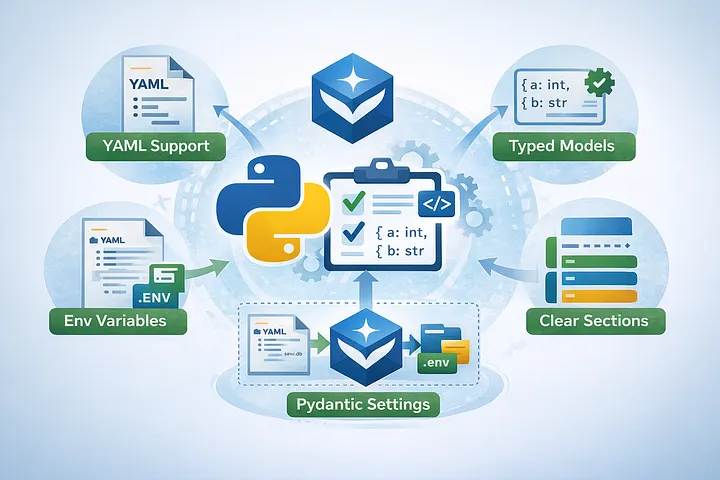
Pydantic-settings provides a clean and powerful way to load configuration from multiple sources (YAML files, environment variables) and map it directly into typed Pydantic models.
Its main advantages are:
- Native support for YAML loading
- Strong typing and automatic validation
- Clear separation of configuration sections
- Built-in support for environment variables and
.envfiles
A good practice when designing configuration files is to split them into logical sections, each corresponding to a subsystem of the application. For example:
database:
  host: <hostname>
  port: <port>
  user: <user>
  sslmode: <ssl mode>

log:
  level: "INFO"
  console: true
  file: "logs/races.log"
  rotation: "10 MB"
  retention: "7 days"
  compression: "zip"
Each section can then be mapped to its own Pydantic model. In our reference application, the database is SQLite, so the configuration is much simpler:
database:
  relative_path: "instance/dev.db"
The application-specific parameters are defined as follows:
app:
  # secret_key is loaded from environment variables
  debug: true
  host: "0.0.0.0"
  port: 5001
One of the key benefits of Pydantic Settings is validation. Configuration errors should be caught as early as possible, ideally at startup.
Whenever feasible, parameters should have sensible default values to reduce the likelihood of runtime failures.
Mapping Configuration to Pydantic Models
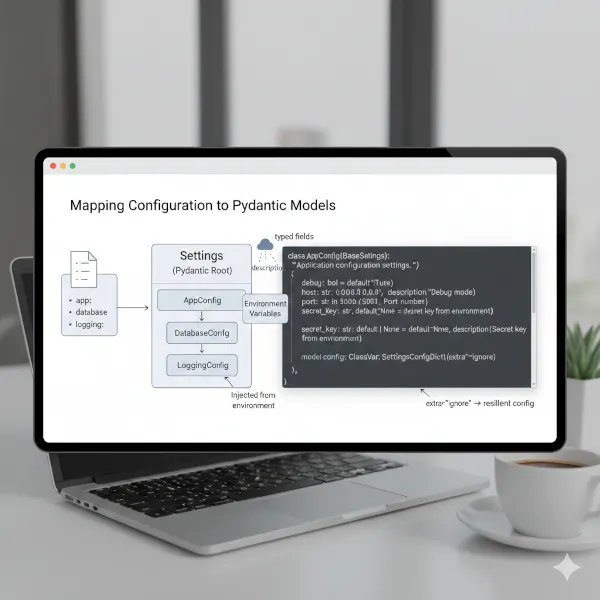
Each configuration section is represented by a dedicated Pydantic Settings class. At a high level, the structure looks like this:
AppConfig→ application-level settingsDatabaseConfig→ database configurationLoggingConfig→ logging behaviorSettings→ root object aggregating all sections
Each class defines:
- typed fields
- default values
- optional environment variable prefixes
Here an example of AppConfig:
class AppConfig(BaseSettings):
    """Application configuration settings."""

    debug: bool = Field(default=True, description="Debug mode")
    host: str = Field(default="0.0.0.0", description="Host address")  # nosec B104
    port: int = Field(default=5001, description="Port number")
    secret_key: str | None = Field(
        default=None, description="Secret key from environment"
    )

    model_config: ClassVar[SettingsConfigDict] = SettingsConfigDict(extra="ignore")
As you can notice, this class represents the app section in the config.yml. It defines each parameter with its own type, description, and default value.
The secret_key is a security-sensitive parameter used by Flask to sign session cookies and other cryptographic data. For this reason, it is not expected to be stored in the YAML file, but injected at runtime from environment variables.
The model_config attribute defines how pydantic-settings handles configuration loading for this model. With extra="ignore", any undeclared configuration parameters are silently ignored instead of causing a startup failure. This makes the configuration layer more resilient to user errors and environment-specific noise.
The YAML configuration file is loaded once and used to populate the Pydantic models. Secrets are injected from the environment, not from the configuration file itself.
For brevity, this article focuses on the structure and concepts. The complete implementation for DatabaseConfig and LoggingConfig can be found in the referenced project files.
The Settings Class: Centralized Configuration
The Settings class is the single entry point for application configuration. It aggregates all configuration sections and delegates parsing, typing, validation, and default handling to pydantic-settings.
class Settings(BaseSettings):
    app: AppConfig
    database: DatabaseConfig
    log: LogConfig
Each attribute maps to a section of config.yml, making the configuration structure explicit and self-documenting.
Configuration Loading via Pydantic
Configuration loading is entirely handled by Pydantic — no manual parsing logic is required:
model_config: ClassVar[SettingsConfigDict] = SettingsConfigDict(
    yaml_file="config.yml",
    env_file=".env",
    env_file_encoding="utf-8",
    extra="ignore",
)
With this setup:
- YAML is parsed automatically
- values are mapped to strongly typed models
- defaults are applied when fields are missing
- invalid or malformed values are detected immediately
Fail-Fast Validation
Configuration is validated at startup. If a required field is missing, has the wrong type, or a section is malformed, the application fails immediately. This guarantees that if the application is running, configuration is valid.
Defaults and Secrets
Default values defined in AppConfig, DatabaseConfig, and LogConfig are applied automatically, reducing boilerplate and startup errors.
Secrets are injected from environment variables after initialization:
def model_post_init(self, __context: Any) -> None:
    secret_key = os.getenv("APP_SECRET_KEY")
    if secret_key:
        self.app.secret_key = secret_key
This keeps secrets out of YAML while preserving centralized validation.
Single Source of Truth
Configuration is instantiated once:
settings: Settings = Settings()
From that point on, settings becomes the single source of truth for the entire application.
In short, the Settings class provides a clean, declarative configuration layer where parsing, validation, and defaults are handled in one place, and the application either starts with a valid configuration or does not start at all.
Check out the running-races repository on GitHub.
Configuration vs Logging: Dependency Direction
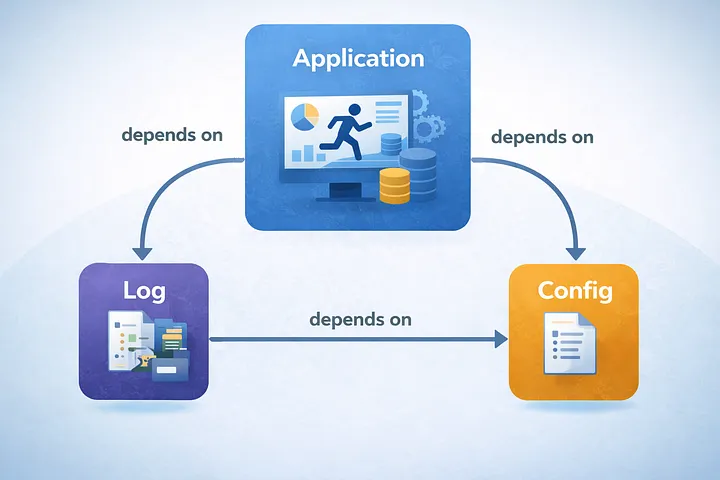
An important architectural detail is the dependency direction between configuration and logging.
- Configuration is the lowest-level component
- Logging depends on configuration
This means:
- configuration must be loaded first
- logging behavior (level, output file, rotation) is driven by configuration
Reversing this dependency would create a circular problem: logging would be needed before configuration is available. Keeping configuration at the lowest level avoids this issue entirely.
Handling Secrets
Secrets are loaded exclusively from environment variables. The configuration module is responsible for:
- reading required secrets from the environment
- validating their presence
- failing fast if a mandatory secret is missing
This ensures that:
- secrets are never accessed directly in application code
- validation happens in a single, well-defined place
- startup fails early and explicitly if misconfigured
By delegating this responsibility to Pydantic Settings, we also benefit from automatic type validation and error reporting.
Configuration in Containerized Applications
In containerized environments, configuration is commonly injected through environment variables. This works well for **secrets, which should never be stored in files or committed to version control.
However, using environment variables for all configuration parameters quickly becomes hard to manage as the number of options grows. Configuration is scattered across deployment manifests and it becomes difficult to get a clear, complete view of how the application is configured.
Using a config.yml file for non-secret parameters solves this problem. YAML provides a structured, self-documented view of the entire configuration, with comments explaining the purpose of each parameter. Environment variables can then be reserved exclusively for secrets.
Different configurations for staging and production can be managed using Kubernetes ConfigMaps, as described in How I use Kubernetes ConfigMaps to manage configurations. This hybrid approach keeps configuration clear, scalable, and secure.
Conclusion
In this article we covered:
- how to separate non-secret configuration from code using a
config.ymlYAML file - why YAML is a better fit than JSON for application configuration
- how to inject secrets safely via environment variables instead of config files
- how to map configuration sections to typed Pydantic models (
AppConfig,DatabaseConfig,LogConfig) - how the
Settingsclass centralises loading, validation, and defaults in one place - how pydantic-settings enables fail-fast validation at startup
- how this pattern scales to containerised applications using Kubernetes ConfigMaps
This approach scales naturally from small scripts to complex, containerized applications, while keeping configuration explicit, validated, and under control. The next article in the series builds on this foundation — stay tuned.
If you enjoyed this article, don’t forget to give it a clap 👏, share it with your friends 🔗, and follow me for more tips and tutorials on software development 📘. Your support helps me create more content like this — thank you! 🙌